
|
|
Course Notes - BuddiesCreating your User ProfileAfter you download and install AIM, the first thing you'll want to do is create a profile. This can be done by clicking 'My AIM' then 'Edit Profile'. I recommend skipping the "Directory" stuff, unless you enjoy getting many unsolicited porn spam IMs. It is of course up to you, however. The last window will allow you to create a profile for fun or for informing people about just who you are. Personally, I give out very little relevent information about myself, preferring instead entertainment. (profile.jpg)
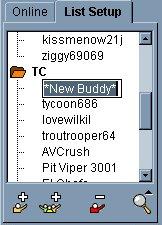
To add a buddy, right click then select 'Add Buddy'. This will give you a new icon with a blank area for the name. Type in the screen name of your buddy, and they are added. To add a new group, right click then select 'New Group'. This will make a folder icon that will contain your buddies to organize your list better. If you wish to move buddies from group to group, just highlight and drag them. So, let's say someone messages you and you want to add them. That's even easier, just click 'Add Buddy' in the IM dialog box, select a group, and they are added.
You can also find buddies using AIM's wizard. Click on People, then Find Buddy Wizard and enter some info and AIM will search its database to find potential matches that meet your query. Once you find a buddy, you can just click the add button to put them on your list. This, unfortunately, uses the same Directory that spammers apparently use, so it's rarely very helpful since most people refrain from giving their full names to anyone who cares to look.
|
 Adding
Buddies
Adding
Buddies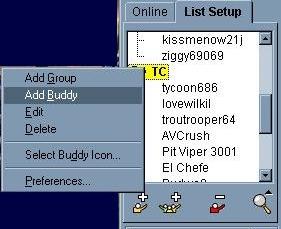 Next,
you'll want to add some people to your contact list. If you know someone's AOL
or CompuServe email address, you've got their AIM username already. From the main area simply
click on the 'Setup' tab. This takes you to the list manager. From there
you can add contacts to your list, as well as adding new contact groups.
Next,
you'll want to add some people to your contact list. If you know someone's AOL
or CompuServe email address, you've got their AIM username already. From the main area simply
click on the 'Setup' tab. This takes you to the list manager. From there
you can add contacts to your list, as well as adding new contact groups.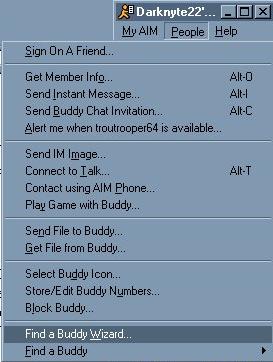 Finding
Buddies
Finding
Buddies